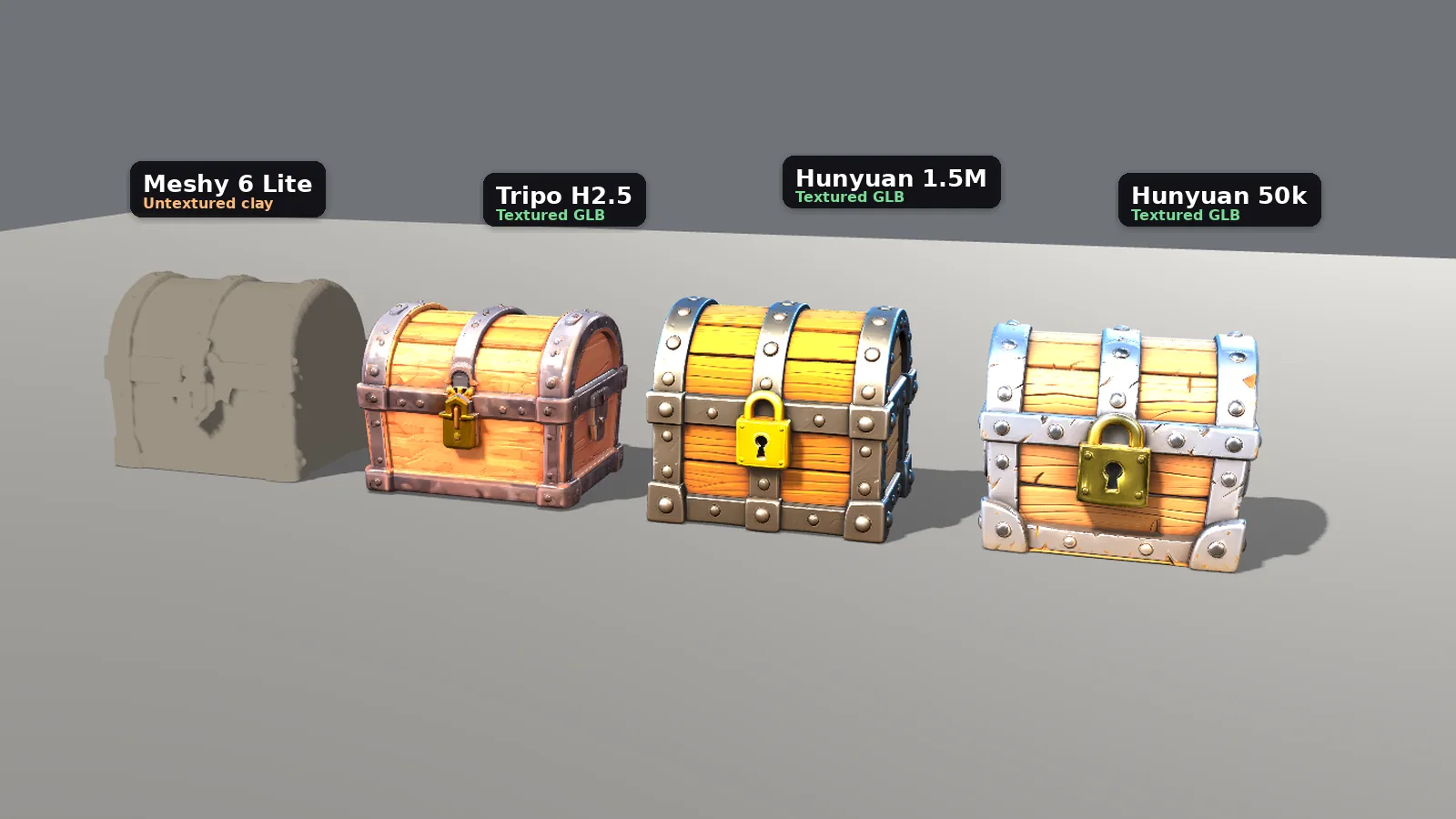
Most "best free AI 3D generator" lists stop at the pricing page. We wanted to see what you can actually put in a game. So we gave Meshy, Tripo, Hi3D and Hunyuan3D the same brief, stayed on each free plan, and imported every file we were allowed to download into Godot.
The brief: a stylized wooden treasure chest with iron bands and a gold lock, game asset.
Verdict: In QuickMatch's test on November 9, 2026, Hunyuan3D was the most generous free option, though we couldn't confirm commercial rights on Hunyuan3D's free web app. It was the only tool that let us download a textured GLB at no cost, and it did that twice: a 1.5 million-triangle chest and a 50,000-triangle chest. Tripo also gave us a textured GLB, but only after we switched from its current H3.1 model to the older H2.5 Legacy model. Meshy's best-looking chest was locked behind "Subscribe to download"; the free workaround is an untextured Meshy 6 Lite mesh. Hi3D's chest looked fine in the browser, but the free plan blocked the download, so it never reached Godot.
This is one prop from one prompt on one day, and it is only a free-plan test in Godot. For a wider pricing-and-license comparison, including paid plans and tools we did not run here, see the best AI 3D model generator for games guide. Plans change, so re-check the live pricing page before you build around a free tier. Free-plan limits checked November 9, 2026.
How we tested Meshy, Tripo, Hi3D and Hunyuan3D
Everything was done on November 9, 2026, on a Linux test machine with no graphics card. The prompt was the same in all four tools. We used a new free account on each site, with no paid plan and no auto-renewing trial. We picked Meshy, Tripo, Hi3D and Hunyuan3D because they were the four free-plan text-to-3D tools we researched for this test — credits, export rules and licenses — before we signed up. We didn't test other generators, such as Sloyd or Hyper3D Rodin, in this run.
The engine was Godot 4.7.2 stable, Compatibility renderer (OpenGL 3), running on Mesa llvmpipe, a CPU software renderer. The shots compare the models fairly; they are not high-end game lighting. Each model was scaled so its longest axis was 2 units, sat on the same mid-grey floor, and used the same lights. If the free plan wouldn't give us a GLB, we still show the in-browser model and say so. Hi3D is missing from the Godot lineup for that reason.
We already have a pricing-and-license comparison of Meshy vs Tripo and the wider AI 3D generator for games guide. This is the hands-on free-plan follow-up in Godot. For 2D art, sound and a wider asset map, see AI game asset generators.
Meshy vs Tripo vs Hi3D vs Hunyuan3D: free plans at a glance
 Meshy |  Tripo | Hi3D | Hunyuan3D | |
|---|---|---|---|---|
| Free allowance | 100 credits, plus a +30 daily check-in on our account | 200 credits | 100 trial credits, plus a daily bonus | 5 free runs a day ("Limited-time 5 free times/day") |
| Cost of our chest | 39 credits for the Agent textured model (9 + 30); 10 more for untextured Meshy 6 Lite, from that same image | 55 credits for H3.1 (no free export); 40 credits for H2.5 Legacy (exported) | 48 credits (3 + 45) | 1 run per model (we ran 1.5M and 50k) |
| Model we used | Agent path: GPT Image 2.5 Flare, then Meshy 7.1. Free GLB: Meshy 6 Lite | H3.1 (current) and H2.5 Legacy (the free export) | Seedream V4.5 image, then v3.0 Quality image-to-3D | 3DGeneration-V3.1 (the viewer labeled it HY3D-V3.1) |
| Time, our test | About 2.5 min for the Agent chest | About 3.5 min for H3.1 (from screenshot timestamps); H2.5 not clearly timed | About 10 min, including a queue | About 5 min for the 1.5M run; about 8 min for the 50k run (from screenshot timestamps) |
| Mesh size | Meshy 6 Lite: 149,240 triangles, 74,616 vertices. We didn't record a triangle count for the locked Meshy 7.1 model | H3.1: 1,875,828 triangles (the UI also showed 983,986 faces). H2.5: 501,558 triangles | 1,962,410 triangles (Model Info labeled this as faces), 1,013,925 vertices | 1,500,000 or 50,000 triangles; we downloaded both |
| Free GLB? | Textured: no. Untextured Meshy 6 Lite: yes | H3.1: no. H2.5: yes, 15 free exports | No | Yes (GLB, and also OBJ, FBX, STL and USDZ) |
| Textures | The Agent model was textured in the viewer but not downloadable. Lite has none | H2.5 download had 4K base color, metallic-roughness and normal maps | Textured in the viewer; we couldn't download them | PBR, with 4K maps, on both downloads |
| License on the free plan | CC BY 4.0; models can't be set to private | Public and non-commercial, on Tripo's pricing page | CC BY 4.0; no commercial use; the Private option was locked | See the license section; the web app's own terms were not fully readable |
| Godot import time | Lite: 0.028 s. The textured model never left the browser | H2.5: 0.727 s | We couldn't import it | 1.5M: 2.250 s. 50k: 0.956 s |
We use triangle counts throughout. Those import times are how long our render script took to load each GLB at runtime; the editor import pass is in a later section. A viewer's "faces" figure is not always the same number as its triangles: Tripo's H3.1 UI listed both (1,875,828 triangles and 983,986 faces). For the triangulated GLBs we could download, the mesh size we measured is the triangle count.
Meshy: a strong preview, a paid download, and an untextured free path
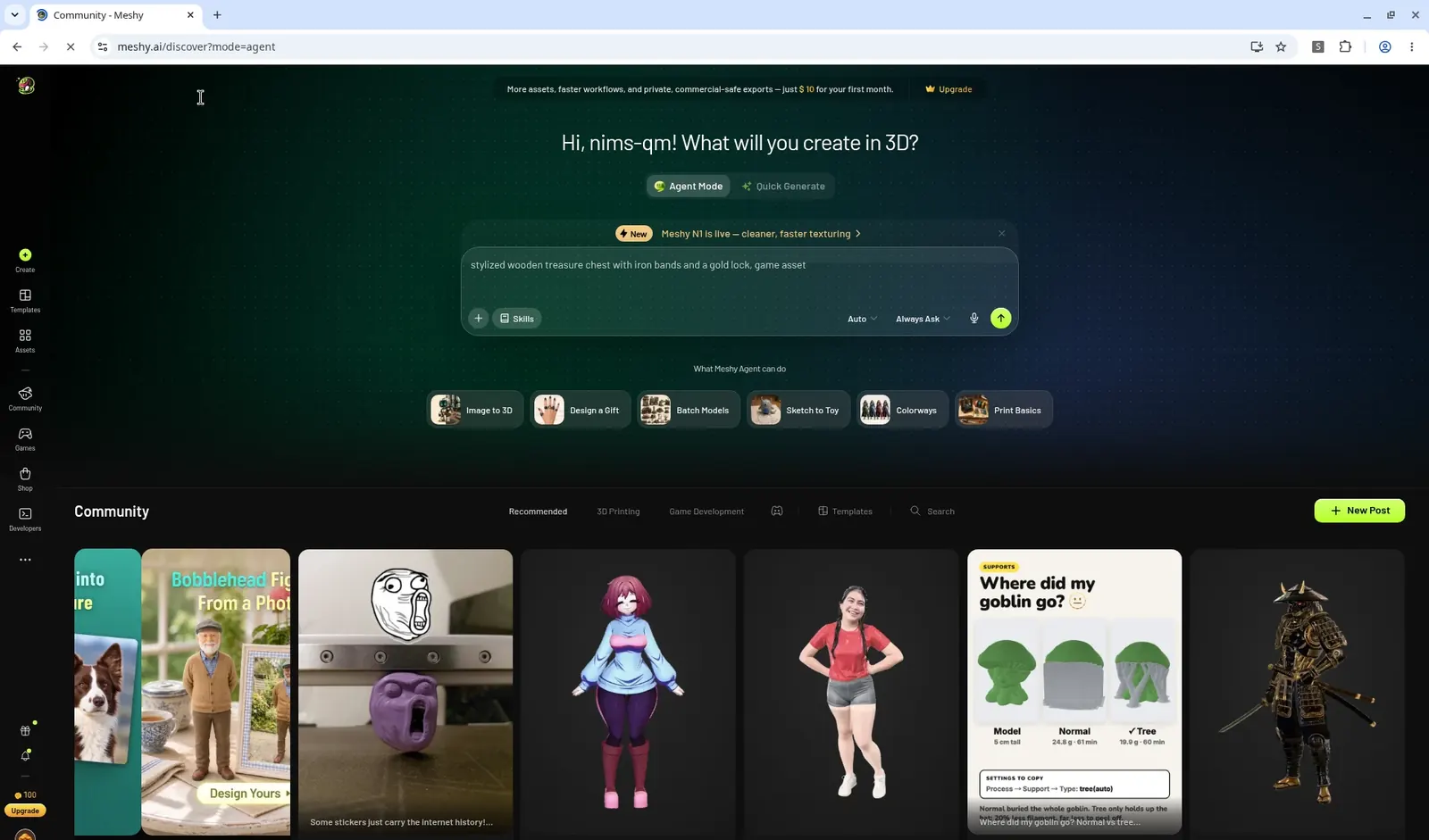
Meshy's free plan started us with 100 credits. The default flow is no longer a straight text-to-3D button. It runs through Agent Mode: the prompt first becomes an image (GPT Image 2.5 Flare, 9 credits), then that image becomes a 3D model (Meshy 7.1, 30 credits). Our chest took about two and a half minutes and used 39 credits.
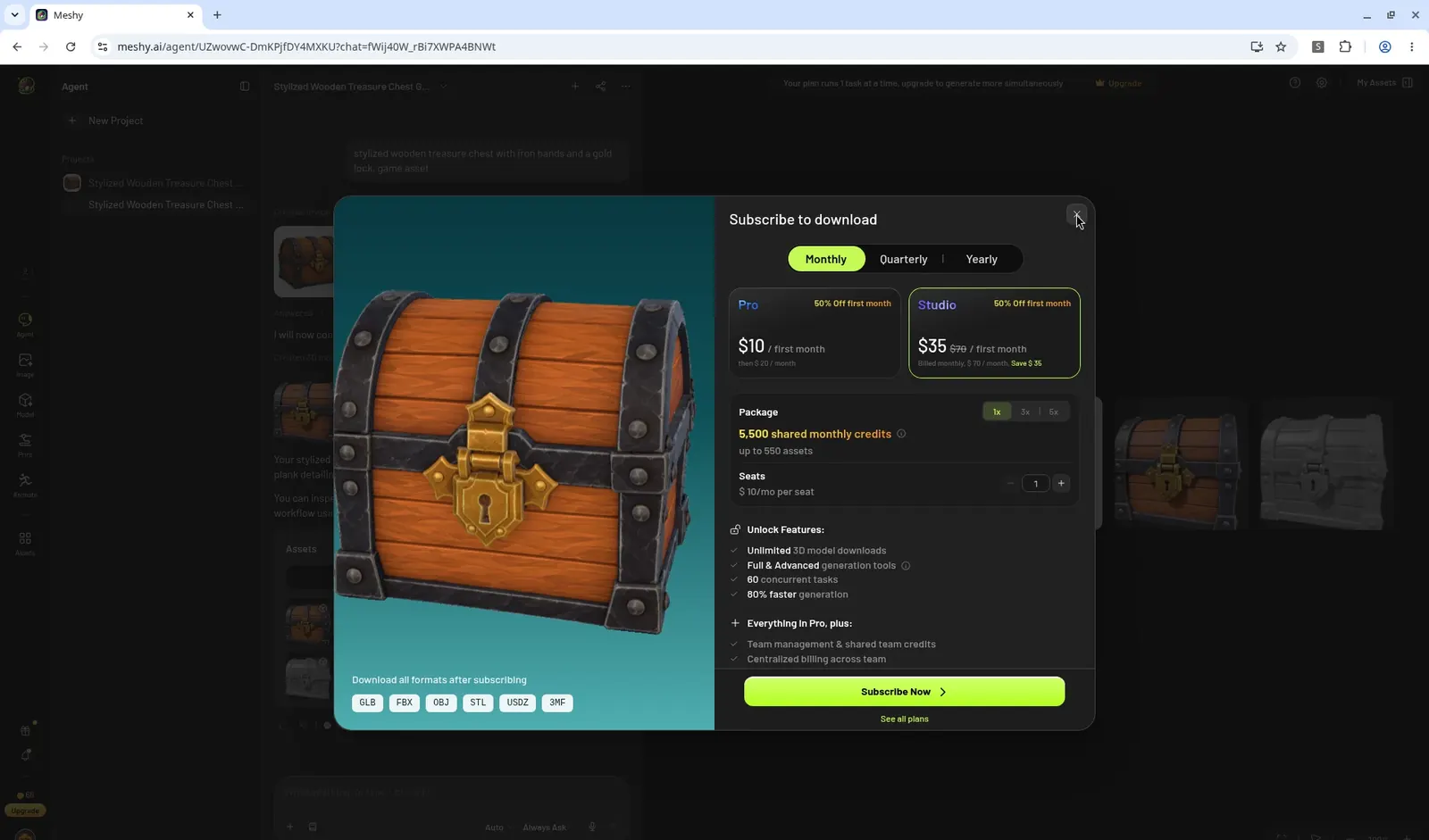
The preview looks like a finished game prop: wood planks, iron bands, a gold lock. You can rotate it and switch to a wireframe view. You cannot take the textured file with you. Every format we tried — GLB, FBX, OBJ, STL, USDZ and 3MF — sat behind Subscribe to download. The modal offered Pro at $10 for the first month (then $20 a month) and Studio at $35 for the first month (then $70). Free models are CC BY 4.0, and the Private toggle was locked.
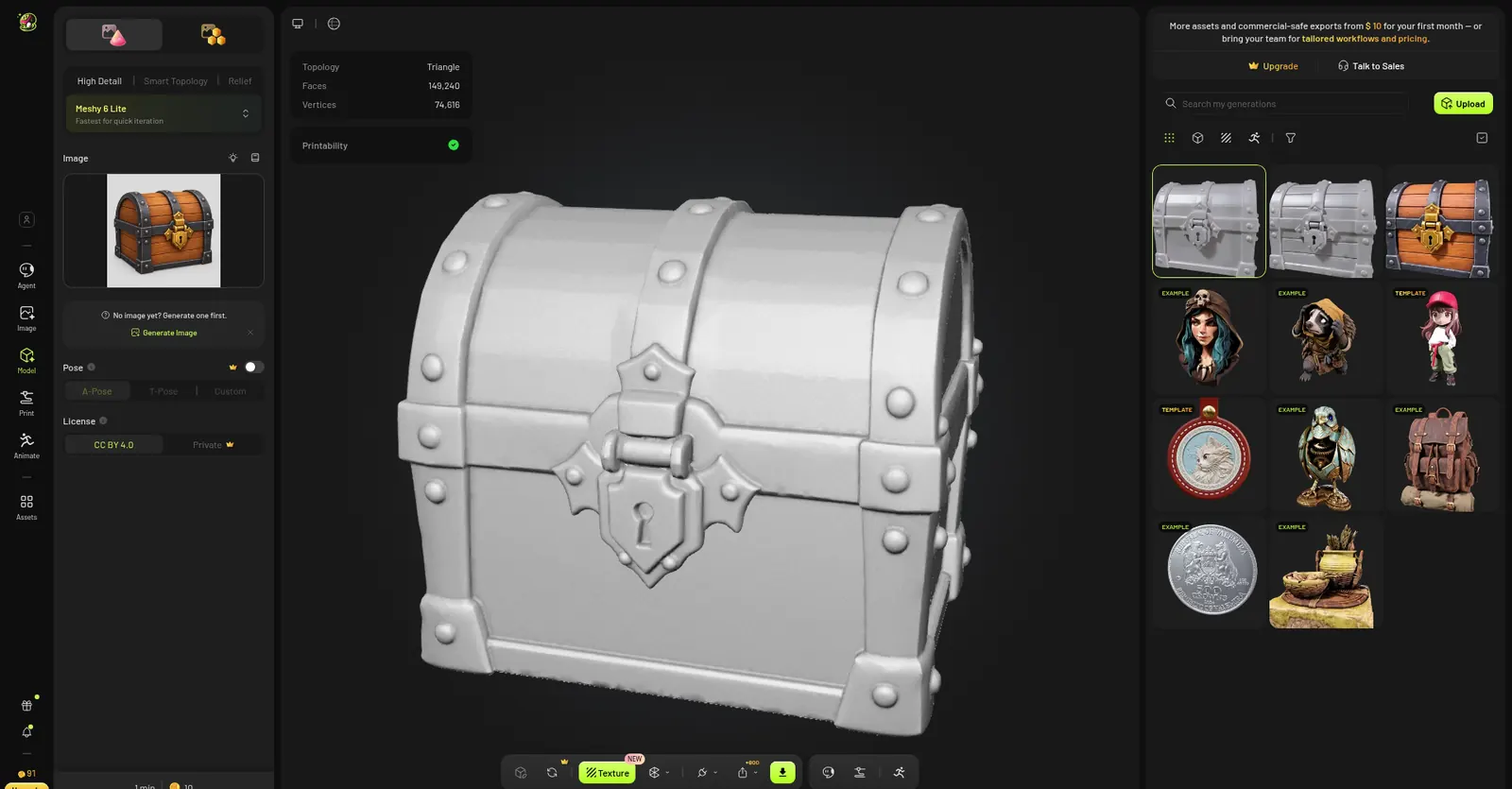
The free workaround is a separate Image to 3D job on Meshy 6 Lite, which cost 10 credits. We used the image the Agent had already made, not a new text prompt. The model is untextured. Meshy's viewer listed 149,240 faces and 74,616 vertices, and the GLB downloaded without a paywall. A daily check-in also added 30 credits to our account. We did not confirm whether Free still caps those Lite downloads; Meshy's help center has said 10 a month, but we only needed one.
In Godot the Lite chest imported in 0.028 seconds. It arrived with a default white material and, under our studio lights, blew out to a featureless white silhouette. For the shots below we gave it a mid clay material in our renderer so you can see the lock, bands and rivets. That clay is ours, not a texture from Meshy.
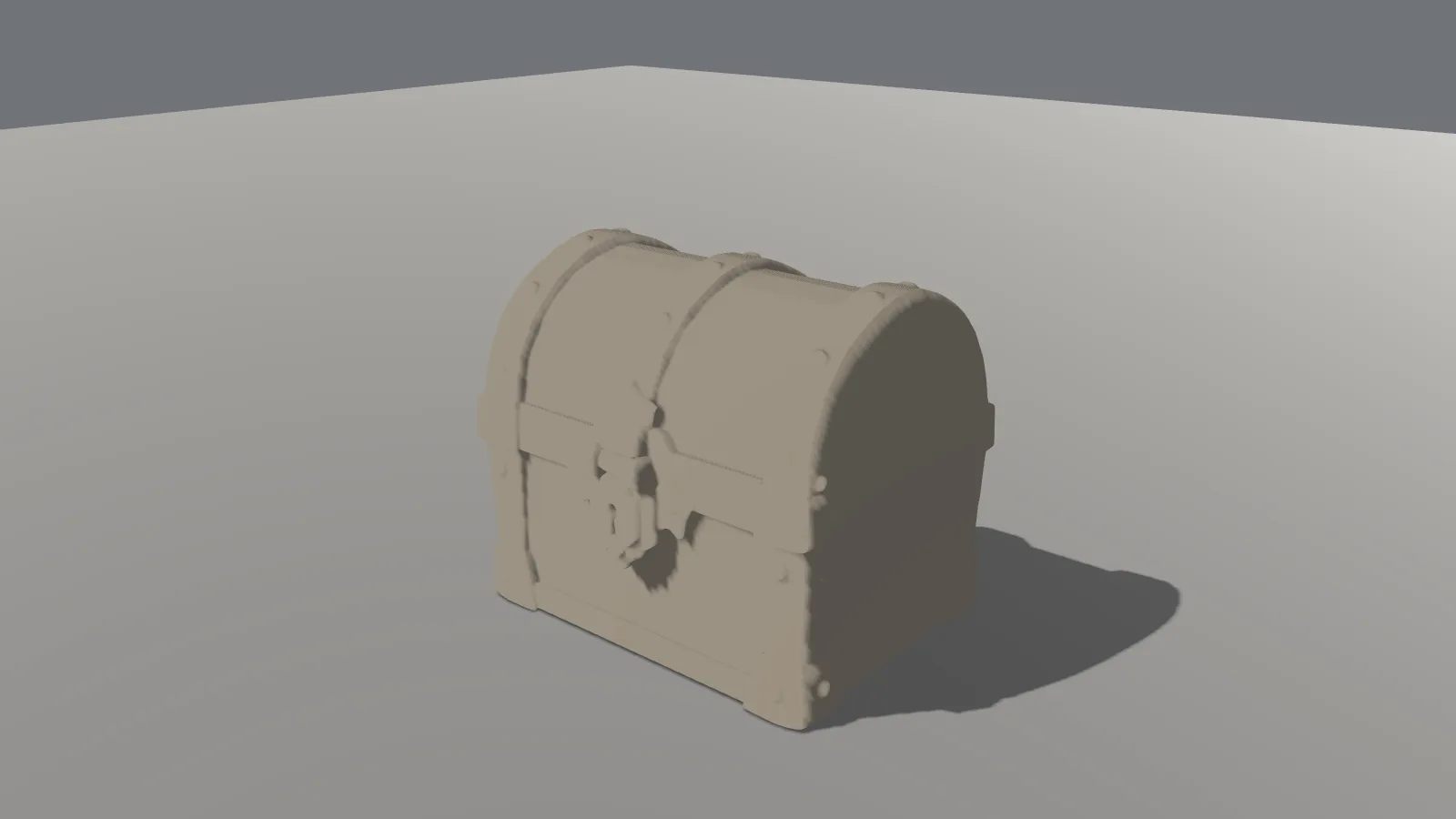
At a normal viewing distance the wireframe is still readable. You can see the bands, the lock and a fairly even triangle distribution. 149,240 triangles is light next to Tripo's half million and Hunyuan's 1.5 million, and heavy next to Hunyuan's 50,000-triangle export.
Tripo: a free textured GLB, but only on the older model
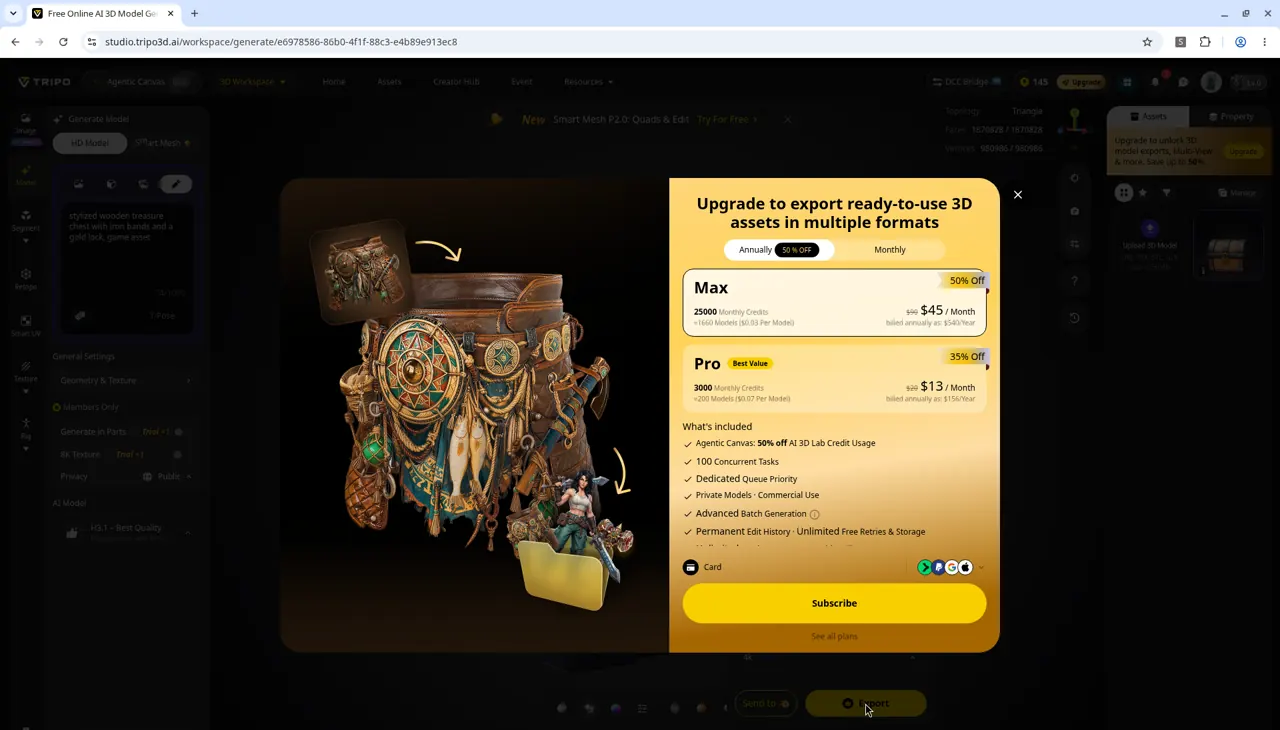
Tripo's free plan gives you 200 credits. We first ran H3.1, the current model, at 55 credits. From the prompt screenshot to the finished-model screenshot, that job took about 3.5 minutes. The viewer listed 1,875,828 triangles and 983,986 faces. The chest looked finished, but exporting it opened an Upgrade to export paywall. Pro was $13 a month and Max was $45 a month, both billed annually ($156 and $540 a year). We also couldn't find a wireframe view in the editor.
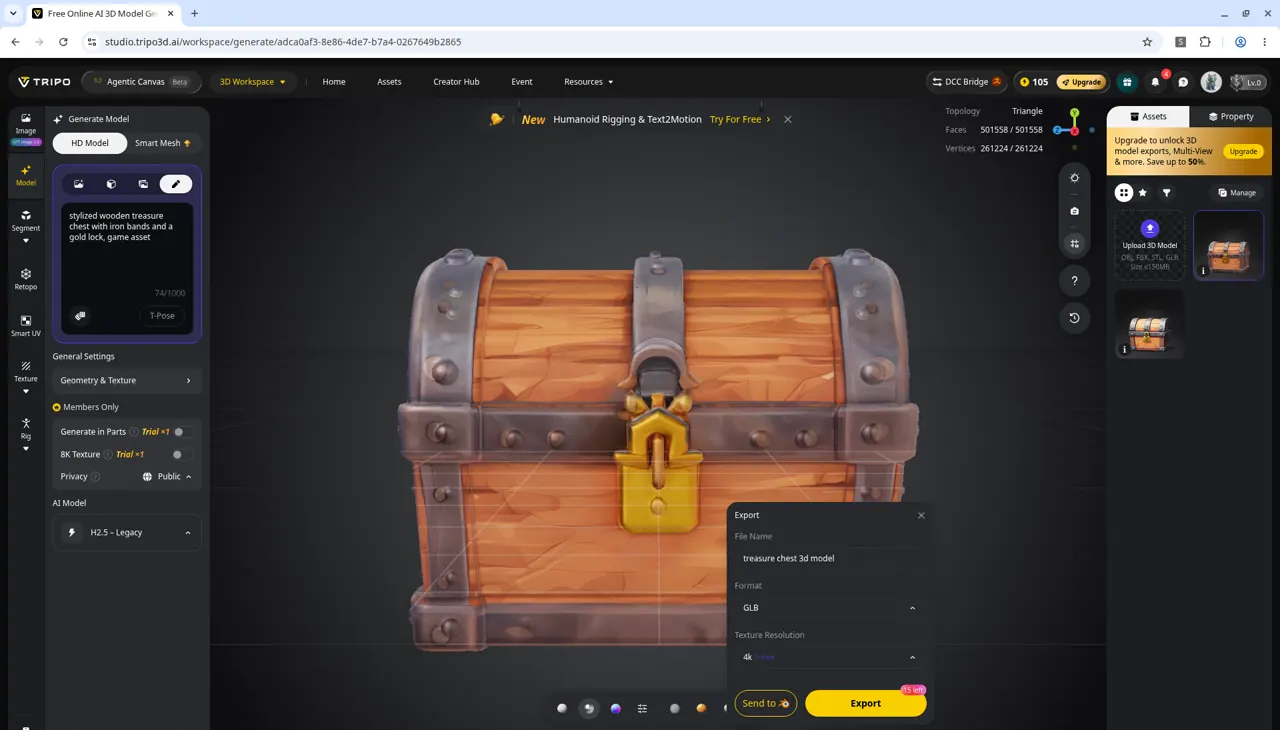
We made the chest again on H2.5 Legacy, which cost 40 credits. That is the model the free plan is allowed to export, up to 15 times. The export dialog listed GLB at 4K and showed 15 left on the Export button. After both runs we had used 95 of the 200 credits (105 remained). The model is public, and Tripo's pricing page describes free-plan models as non-commercial. A separate credits doc has used softer "with attribution" language; we treated the stricter pricing-page wording as the working rule.
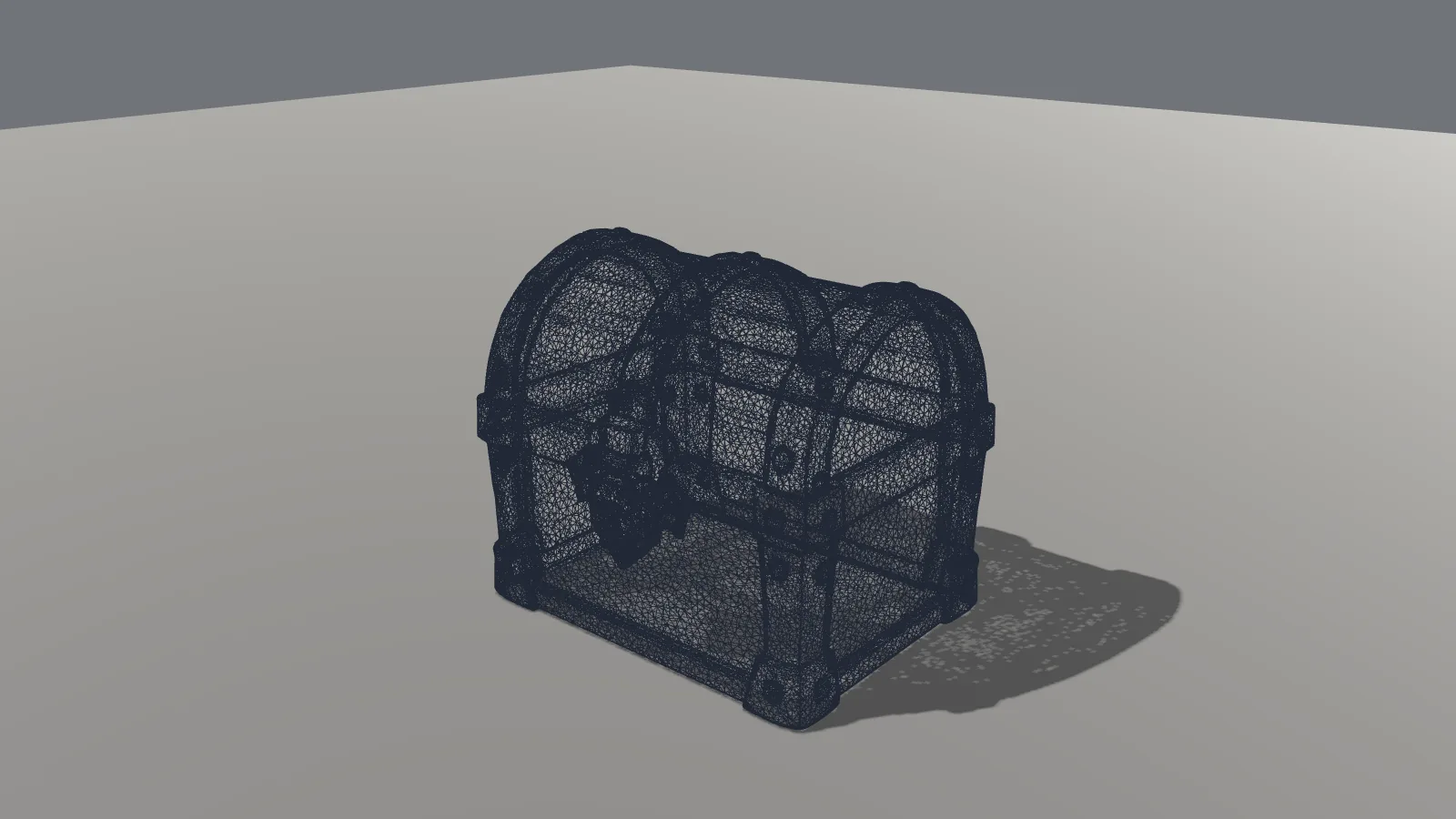
The H2.5 GLB is 19.42 MB, with 501,558 triangles and three 4K maps (base color and metallic-roughness as JPEG, normal as PNG). Those textures are 5.71 MB, about 29% of the file. Godot imported it in 0.727 seconds, and all three maps loaded. In the engine it is the most "painted" of the free Meshy and Tripo options.
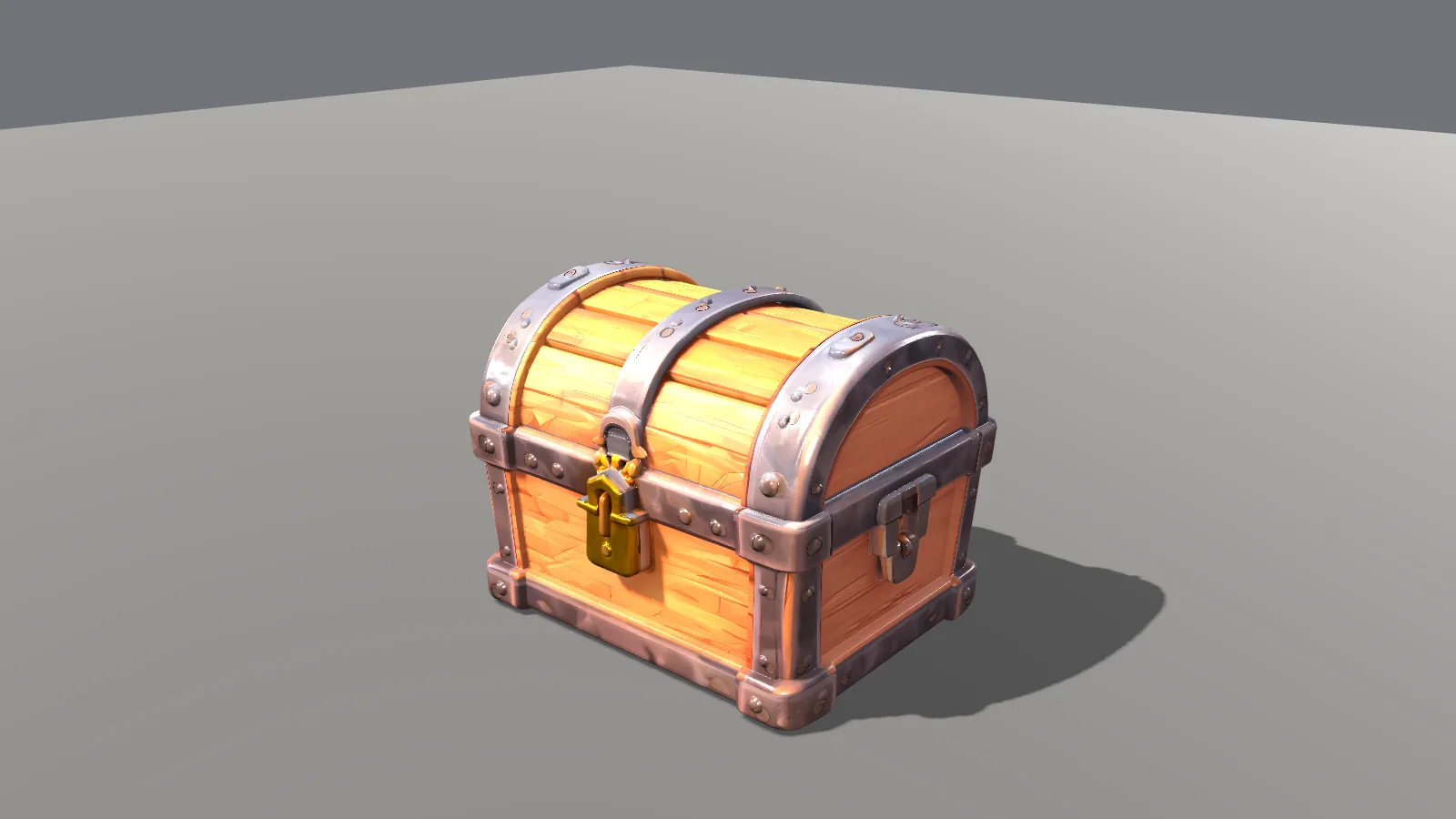
The catch is the mesh. At a normal distance the wireframe fills in to a dark silhouette. You only see individual triangles in a close-up, and even then the surface is a dense blur. 501,558 triangles is a lot for a chest-sized game prop.
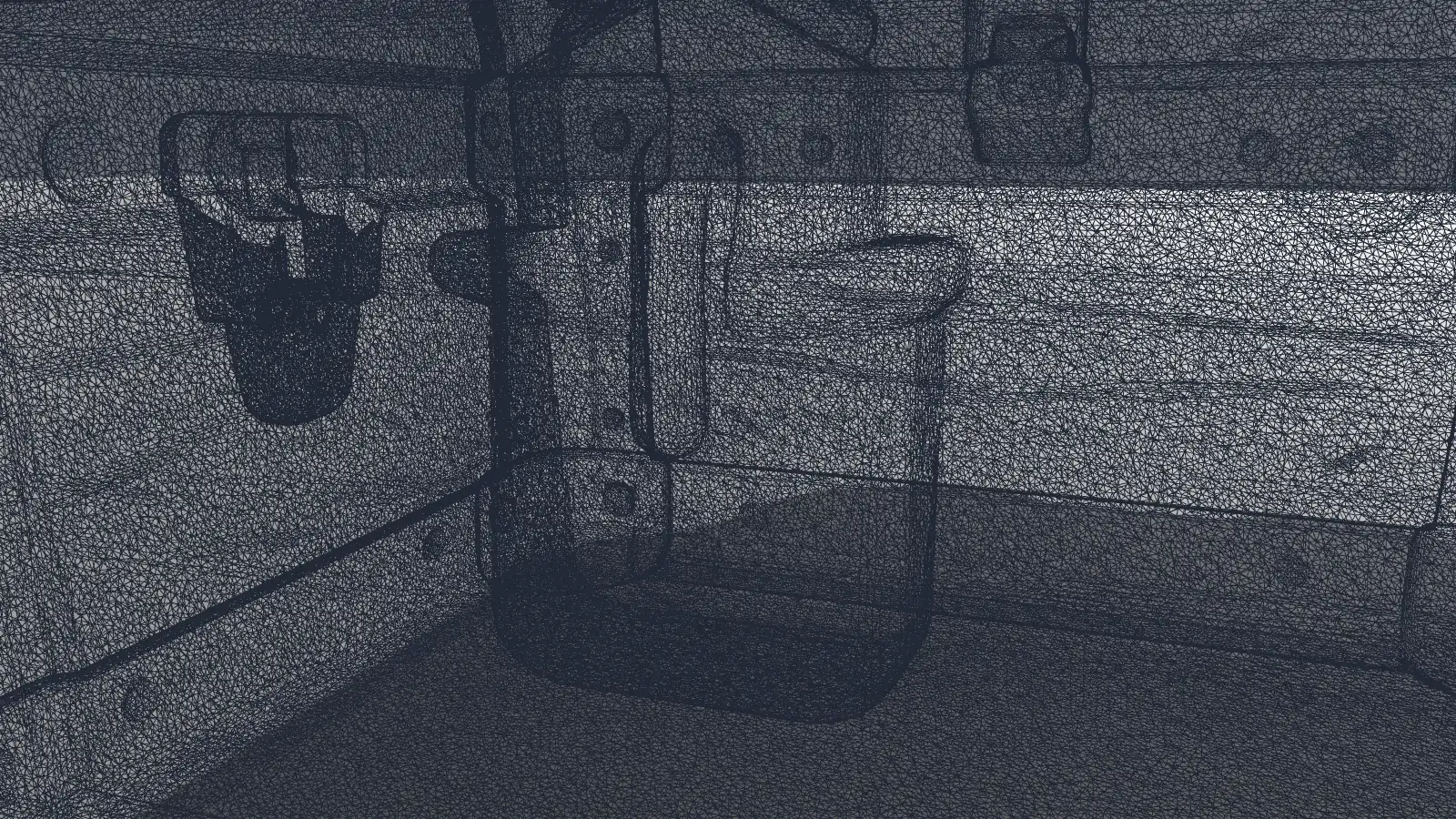
Hi3D: a detailed viewer model you can't take into Godot
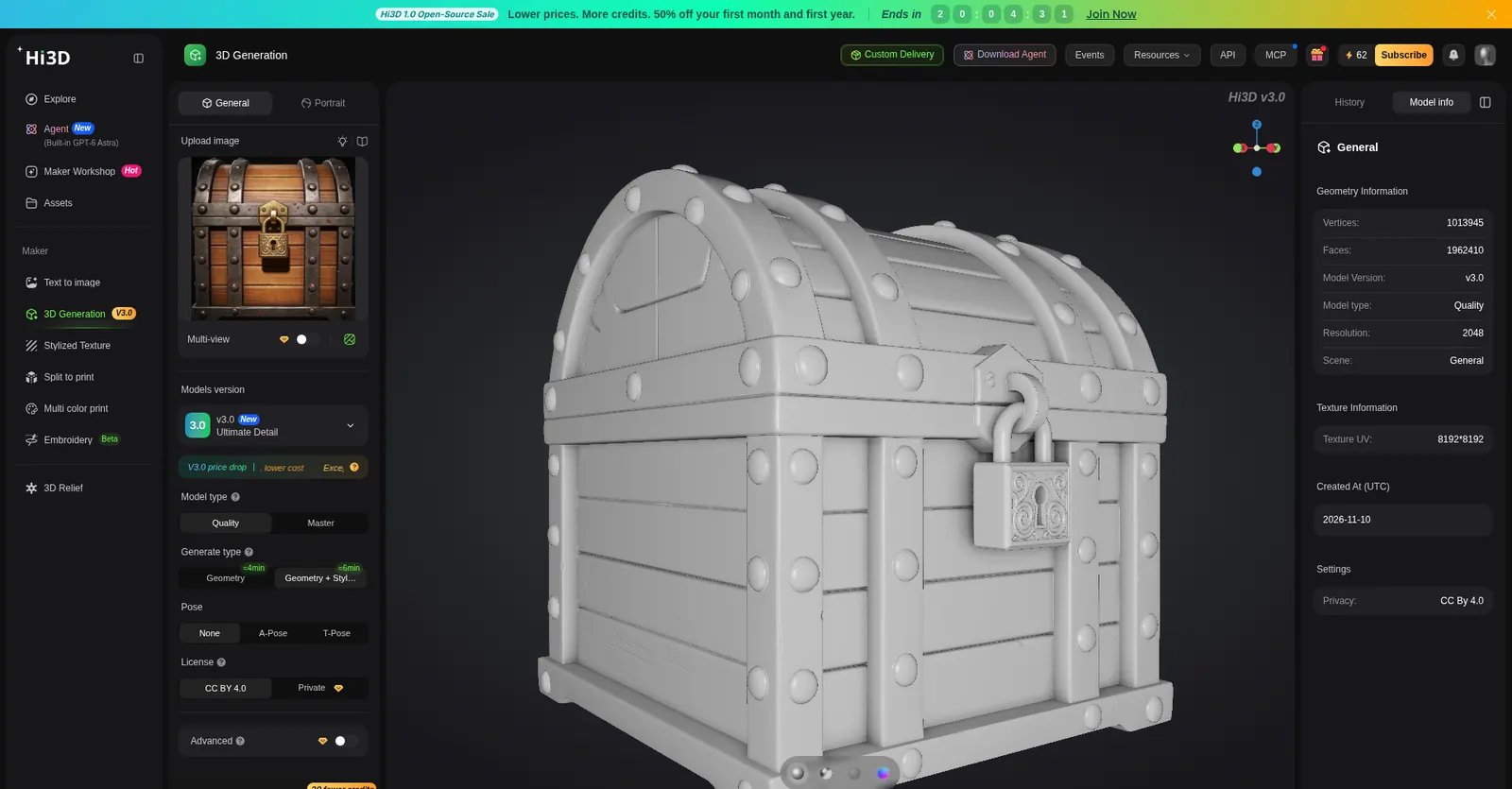
Hi3D (formerly Hitem3D) started us with 100 trial credits and a daily bonus. Text-to-3D was a two-step path: Seedream V4.5 made the image (3 credits), then v3.0 Quality image-to-3D built the mesh (45 credits). The job took about 10 minutes, including a queue. After it finished, the credit badge read 62.
The Model Info panel listed 1,962,410 faces, 1,013,925 vertices, model version v3.0, type Quality, and a 2048 resolution. Privacy was CC BY 4.0, and the Private option was locked. In the viewer the chest is a complete stylized prop. A white clay/diffuse view is available; we didn't find a proper wireframe toggle.
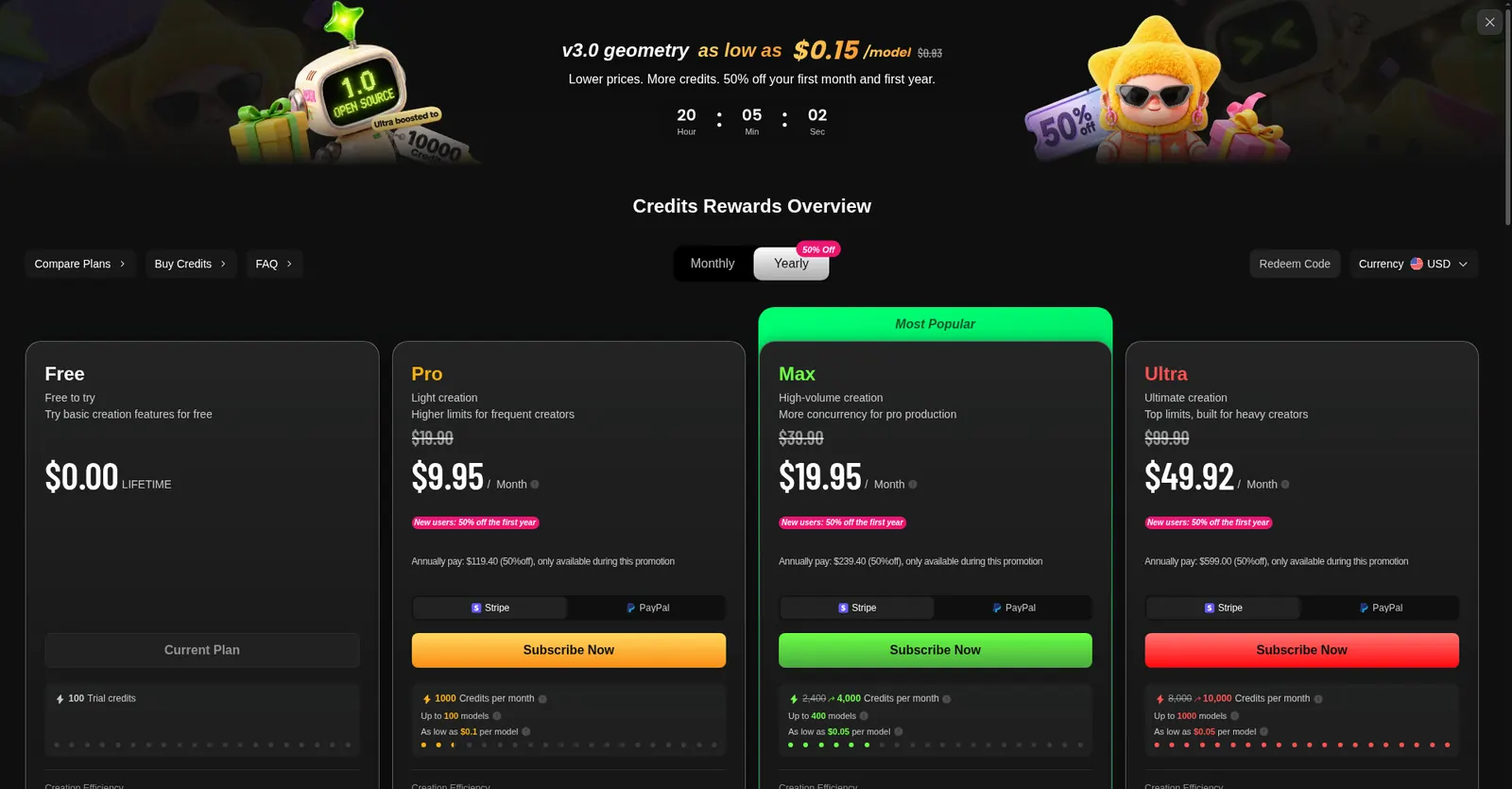
Trying to download opened the pricing modal. The Free plan is listed at $0 lifetime, as the current plan, with 100 trial credits. Paid yearly prices on that modal were Pro at $9.95 a month, Max at $19.95 and Ultra at $49.92. The free plan does not allow 3D model downloads and does not allow commercial use. There is no Hi3D model in our Godot lineup, and no import time, because there was nothing to import.
Hunyuan3D: two free textured downloads, including a 50k game-sized mesh
Hunyuan3D is Tencent's hosted app (Tencent HY 3D Global). The top bar said Limited-time 5 free times/day. You pick the model — we used 3DGeneration-V3.1 — and a face count of 1.5M, 1M, 500k or 50k, then generate. Each job uses one of the day's runs.
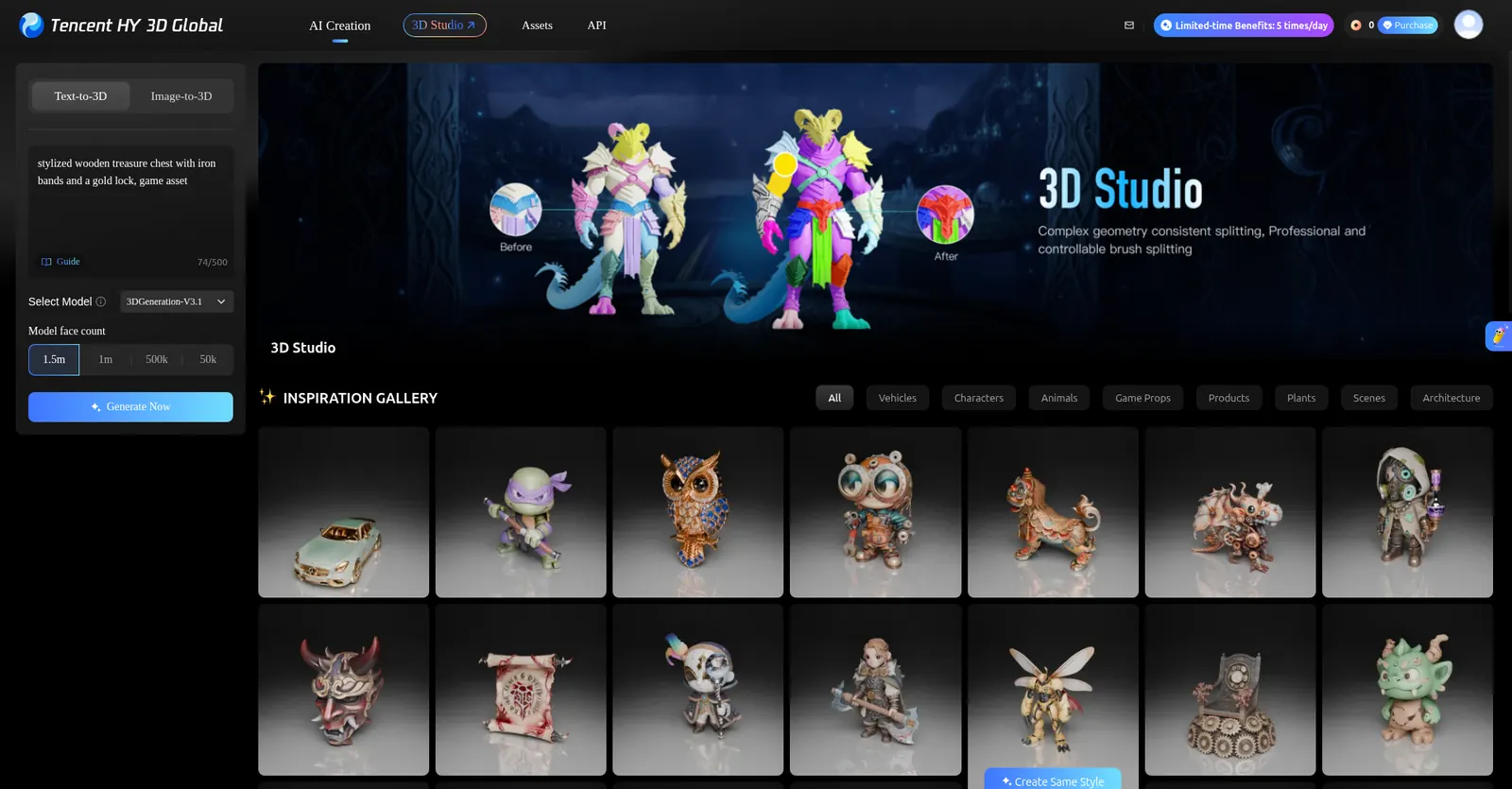
The 1.5 million-triangle run took about five minutes. The viewer listed 1,500,000 faces and 832,057 vertices, matching the GLB we later measured. Download was available on the free plan, in GLB, OBJ, FBX, STL and USDZ. We took the GLB.
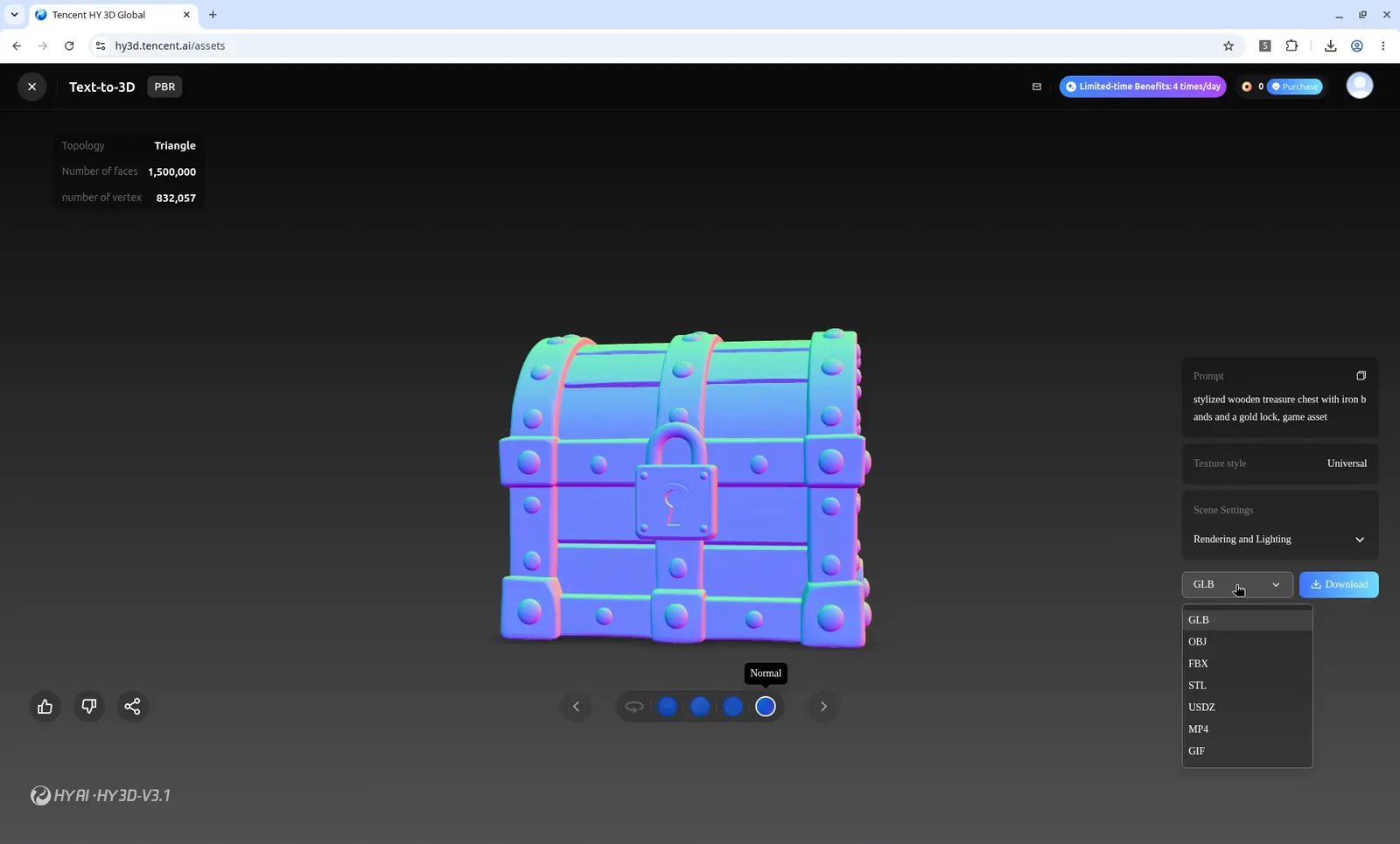
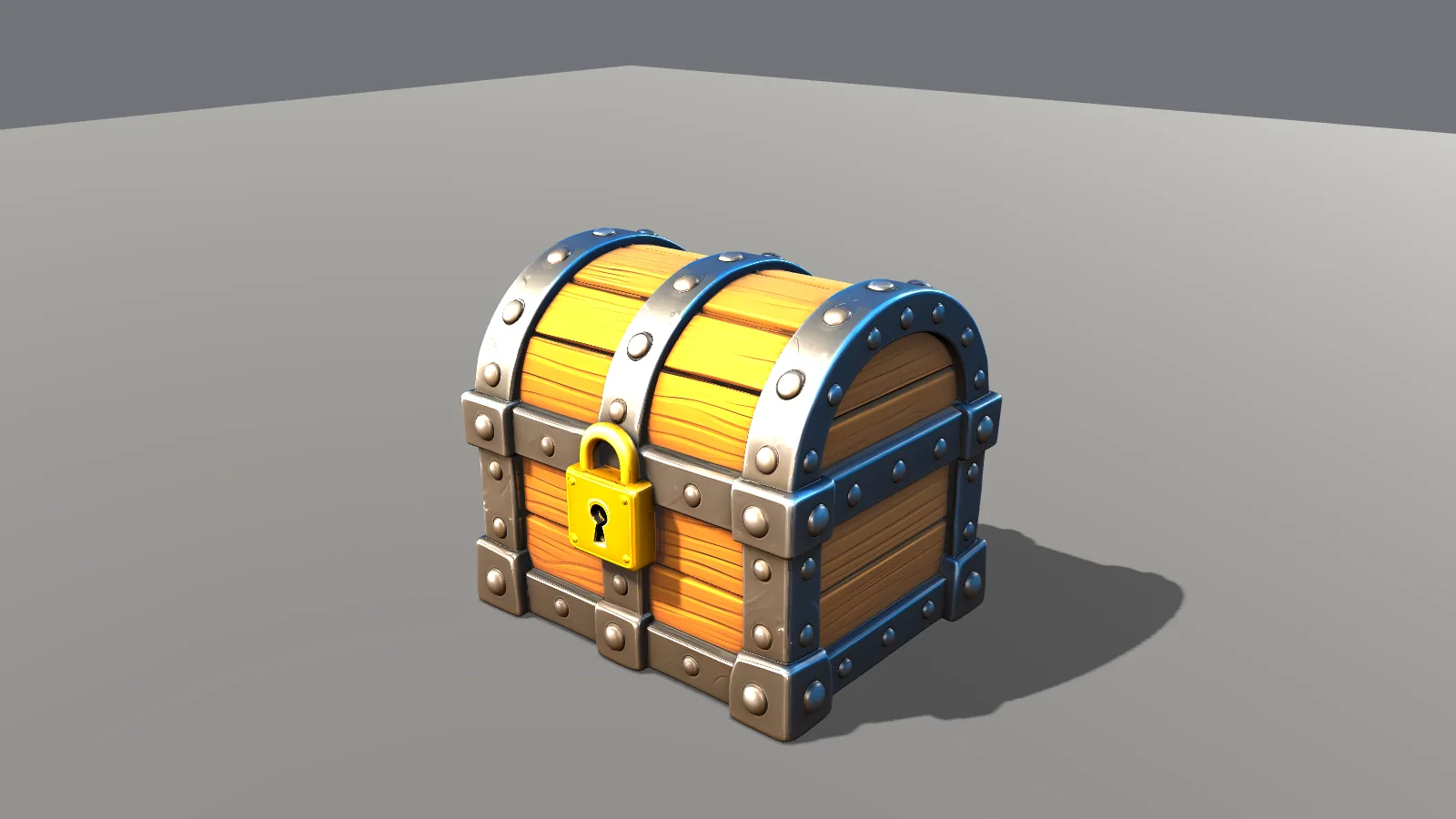
That file is 79.95 MB: 1,500,000 triangles, 832,057 unique vertices, and three 4096×4096 PNG maps (base color, metallic-roughness and normal), plus a specular channel. The textures are 37.39 MB, about 47% of the file; the rest is almost all mesh. Godot imported it in 2.250 seconds, and the PBR maps loaded.
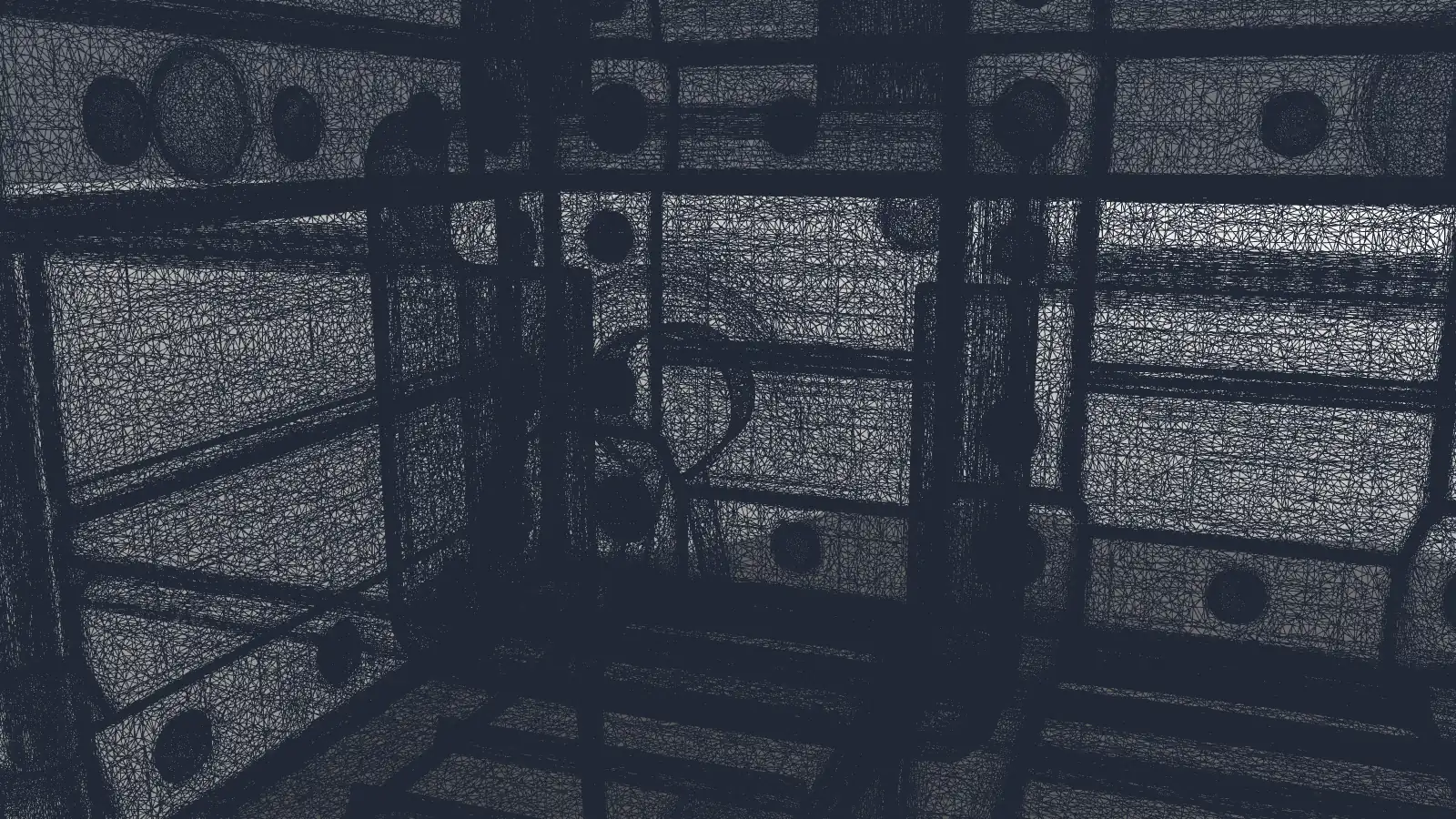
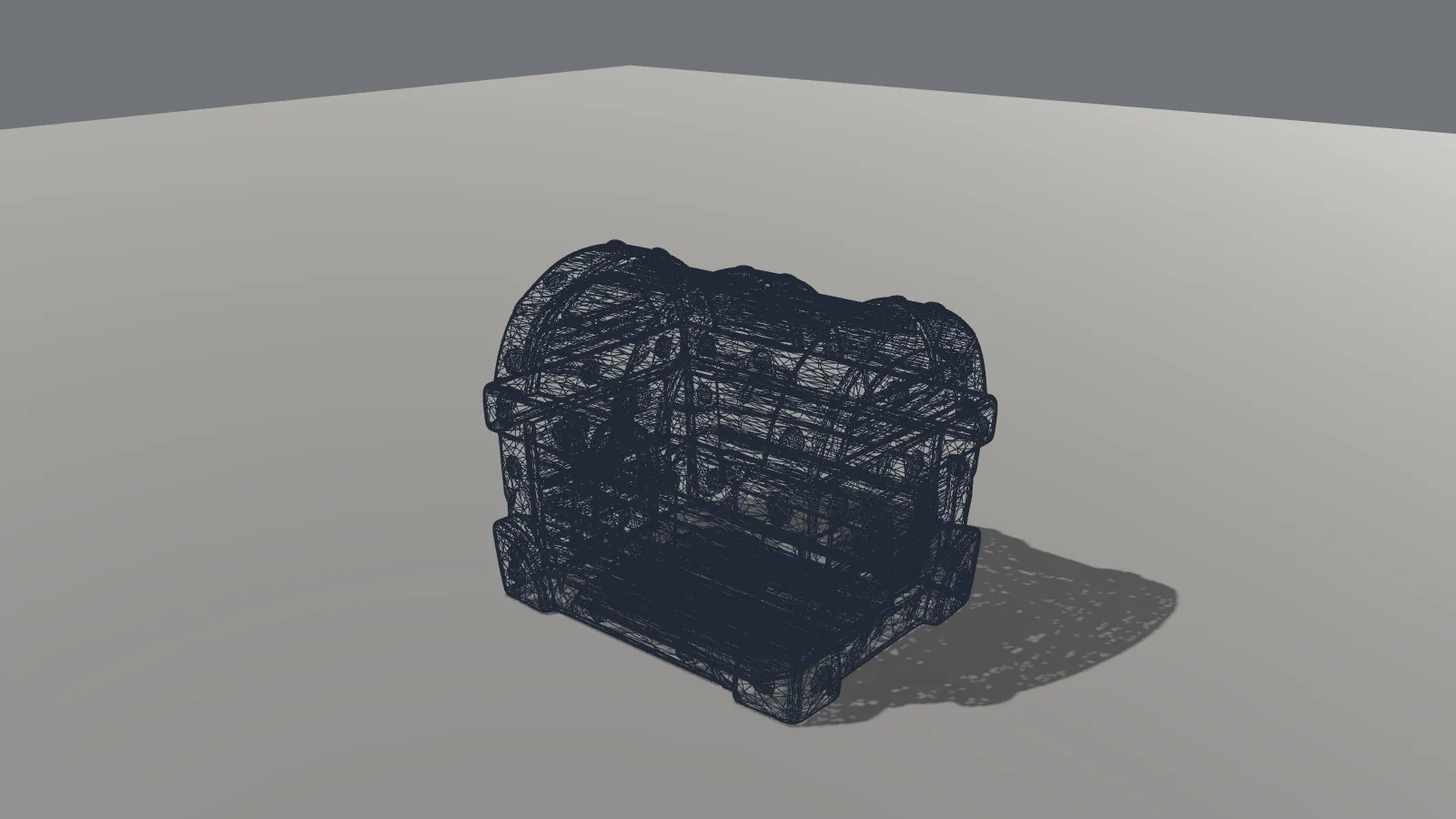
The 1.5 million-triangle wireframe is a solid dark block at a normal distance. Even a close-up of the lock is a thicket of edges. This is not a game-ready polycount for a prop of this size.
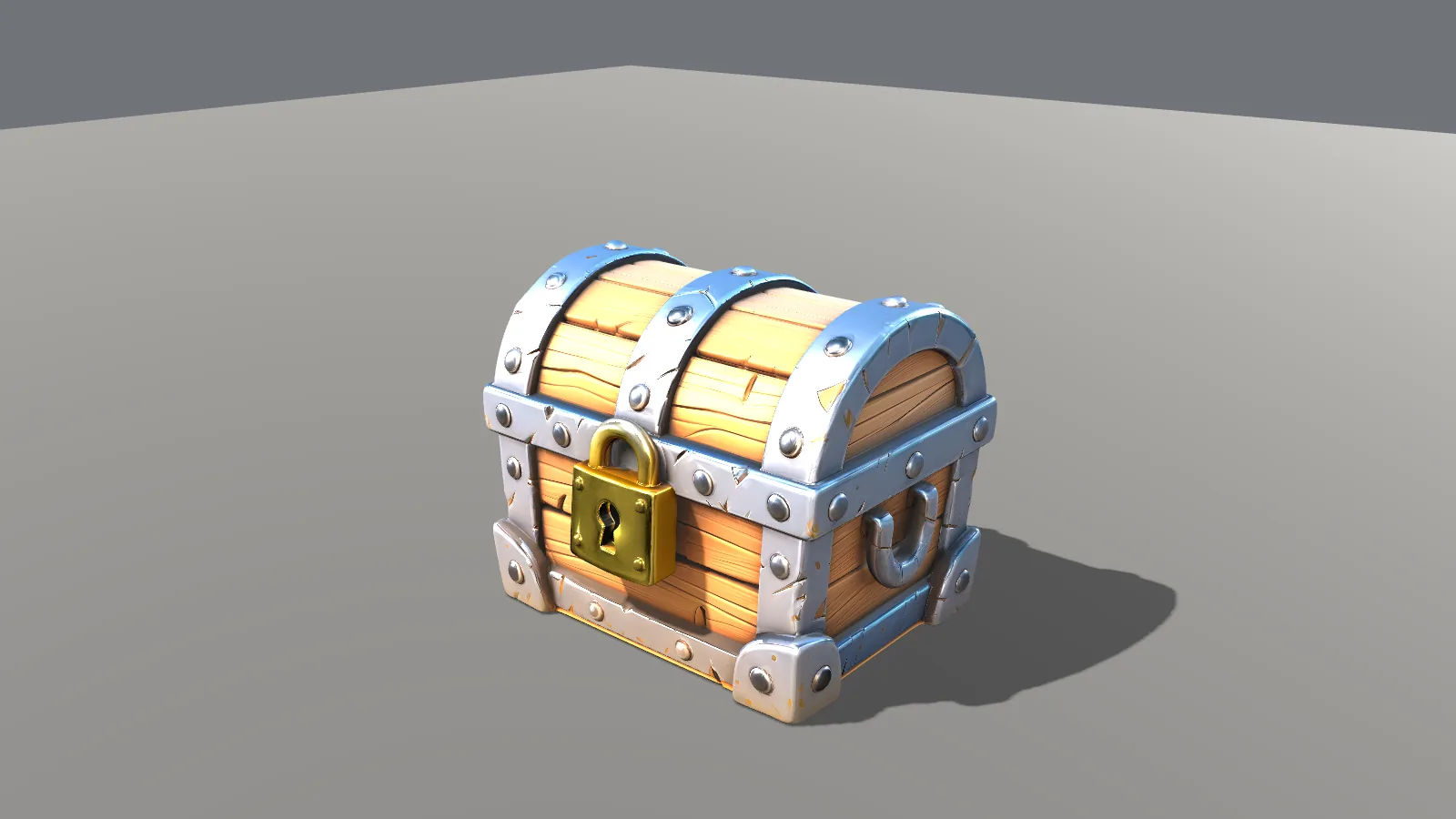
We then ran the same prompt again at 50k faces — a second daily run, not a decimation of the 1.5 million-triangle file. That 50k job took about 8 minutes, measured from the settings screenshot to the finished-model screenshot. The two chests are visibly different: the 50k version has lighter wood, brighter silver-blue metal, a different lock, and a slightly different silhouette. If you want the 50k mesh, pick 50k before you generate.
The 50k GLB is 40.71 MB, with 50,000 triangles and 31,595 unique vertices. It still has three 4096×4096 PNG PBR maps. Those textures are 39.46 MB — 96.9% of the file. The mesh and glTF wrapper are only 1.25 MB. Godot imported it in 0.956 seconds. In the engine it looks like a finished stylized prop, and its standard-distance wireframe is the first one in this test that stays readable.
Who owns a Hunyuan3D download?
We used the hosted web app at hy3d.tencent.ai. The footer points to a Tencent HY 3D Terms of Service document (updated February 6, 2026), plus an Acceptable Use Policy and a Privacy Policy. That terms document is a Tencent Docs page, and the ownership clauses were behind a login we could not read in a plain browser session. We cannot quote a web-app rule for who owns the file or whether the free daily runs are cleared for commercial use.
A related, publicly readable document is the Tencent Cloud HY 3D Global API Terms of Service (updated March 10, 2026). Those API terms assign Tencent's rights in the output to the customer, subject to the agreement, and Tencent keeps a right to use inputs and outputs to run and improve the service. They also say that if you publish output, you should mark it as AI-generated. Those terms are for the Cloud API, not clearly for the free web app we used, so we are not treating them as a commercial license for the two GLBs in this test.
The open-weights Hunyuan3D 2.1 community license is a third, different product. It allows commercial use with conditions, including territory limits (it excludes the EU, UK and South Korea) and a separate approval above 1 million monthly active users. We did not use the 2.1 weights.
Bottom line: we could download the files for free. We could not, from a fully readable web-app TOS, confirm who owns them or whether you can ship them in a commercial game. If that matters for your project, read the terms while signed in, or ask Tencent, before you rely on the free web app.
Meshy, Tripo and Hunyuan3D models side by side in Godot
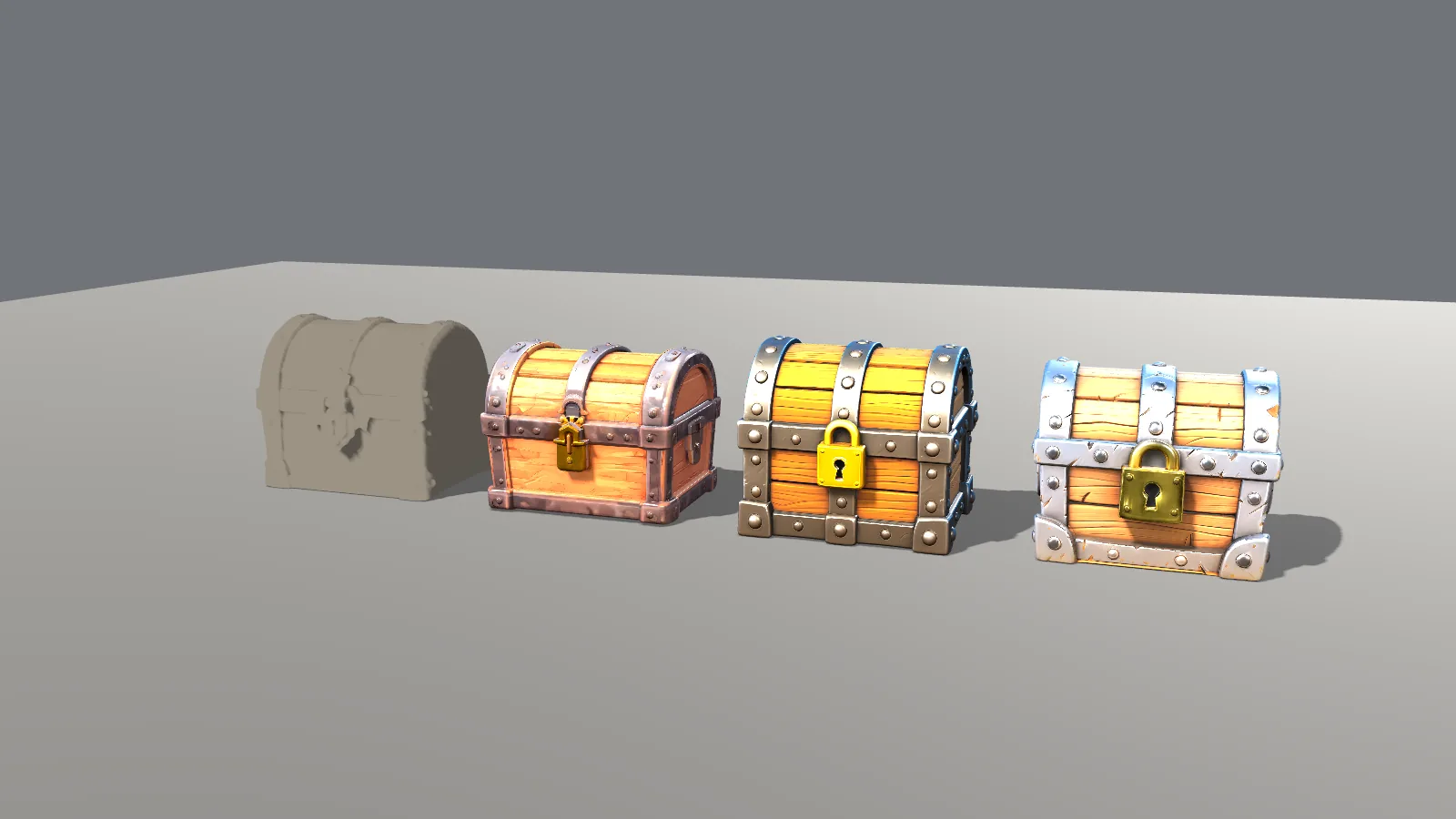
The lineup we could import, left to right: Meshy 6 Lite (clay, because it has no textures), Tripo H2.5, Hunyuan 1.5M and Hunyuan 50k. Each is scaled so its longest axis is 2 units, on the same floor, under the same lights. Hi3D is absent because the free plan would not give us a file.
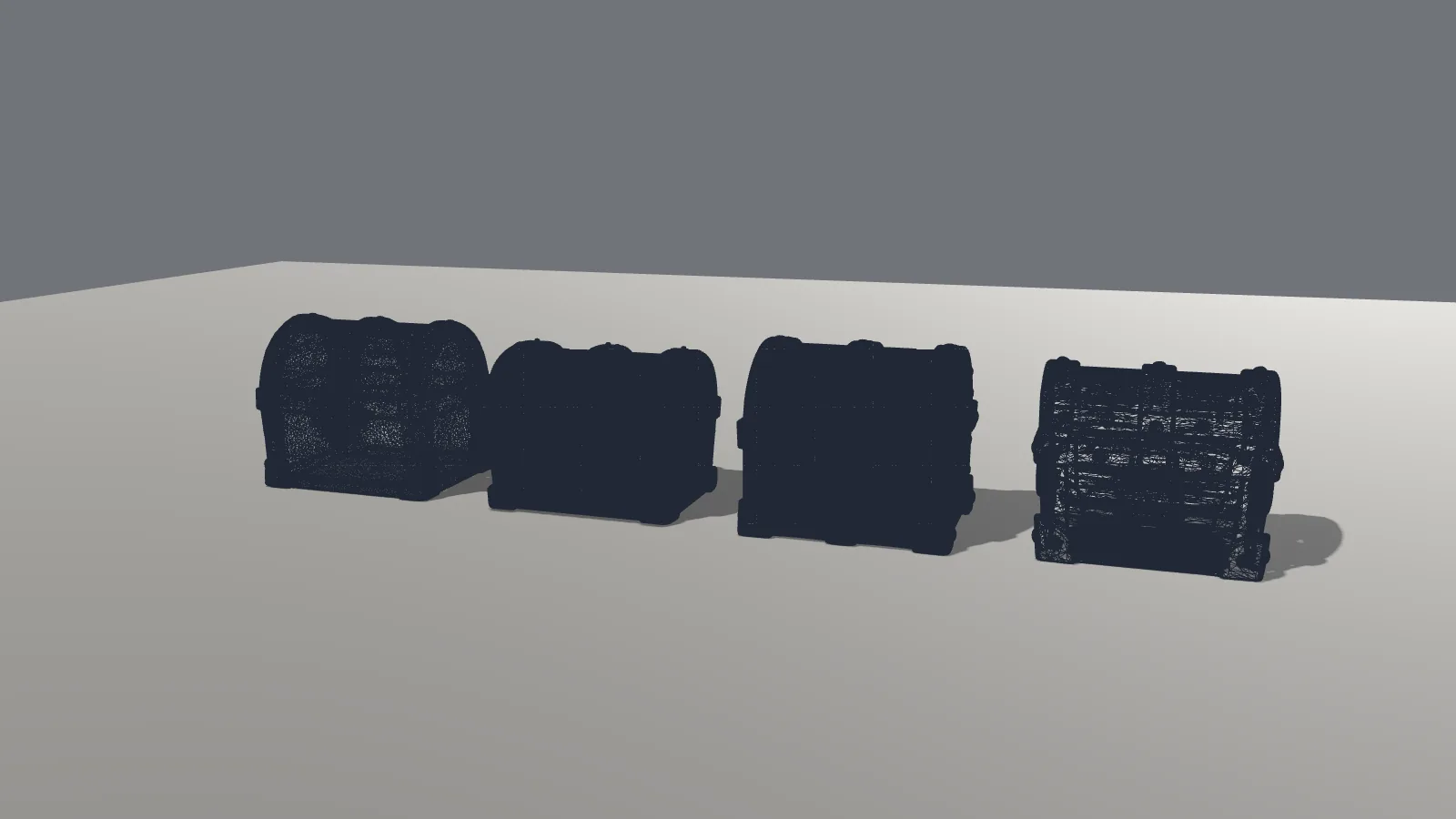
The wireframe lineup is the clearest picture of density. Hunyuan 50k (right) is a readable cage. Meshy Lite (left, 149,240 triangles) is busy but still a chest. Tripo H2.5 and Hunyuan 1.5M fill in to dark silhouettes.
Performance: 25 copies, CPU renderer only
To compare runtime cost we instanced 25 copies of each chest in a simple Godot scene (the mesh was shared, the way you would instance a prop) and measured frame time on Mesa llvmpipe. We averaged at least three frames after a short warmup; the heavier meshes needed longer than five seconds to collect that many frames.
| Model (25 copies) | Triangles on screen | Average frame time | Average FPS (llvmpipe) | Slowdown vs 50k | Peak memory (process RSS) |
|---|---|---|---|---|---|
| Hunyuan 50k | 1.25 million | 1,124 ms | 0.89 | 1× | 1.15 GB |
| Meshy 6 Lite | 3.73 million | 1,442 ms | 0.69 | 1.28× | 724 MB |
| Tripo H2.5 | 12.5 million | 4,187 ms | 0.24 | 3.72× | 2.59 GB |
| Hunyuan 1.5M | 37.5 million | 27,697 ms | 0.036 | 24.6× | 2.91 GB |
Caption: 25 copies on Mesa llvmpipe, a CPU software renderer, not GPU FPS. Slowdown is average frame time divided by the Hunyuan 50k figure (1,124 ms).
The order follows the triangle count more than the file size. Hunyuan 50k was the lightest to draw, then Meshy Lite, then Tripo, then the 1.5 million-triangle Hunyuan chest, which was 24.6 times slower than its 50k sibling on this CPU renderer. The 50k file is still large on disk because of those 4K PNGs, but once the textures are loaded, the cheaper mesh is the one that moves.
How to import an AI-generated GLB into Godot
This is what we actually did in Godot 4.7.2, plus a few Import dock options from the official docs that we did not change in this run.
What we ran. We copied the four GLBs we could download — Meshy 6 Lite, Tripo H2.5, Hunyuan 50k and Hunyuan 1.5M — into a Godot 4.7.2 project folder and ran the editor importer from the command line (godot --headless --import). Godot treated each file as a 3D scene (a PackedScene). For the textured files, it extracted the embedded maps next to the GLB: three images each for Tripo (base color and metallic-roughness as JPEG, normal as PNG) and for both Hunyuan chests (base color, metallic-roughness and normal as PNG). Meshy Lite has no textures, so nothing was extracted. Godot also wrote a .import sidecar for each file and compiled the results under .godot/imported/ (a .scn scene and a .ctex texture for each map).
The default settings in those sidecars had Generate LODs and Create Shadow Meshes turned on, and glTF embedded texture handling set to extract the maps (the value stored as gltf/embedded_image_handling=1, which matches the extracted files). After this first import, the extracted textures were stored as lossless CompressedTexture2D resources (compress/mode=0, with vram_texture: false in the metadata) and mipmaps were enabled. Godot's image import documentation says that once a texture is used in a 3D scene, Detect 3D can switch it to VRAM Compressed. We did not instance these files in the editor after import, so we did not trigger that reimport, and the textures were not VRAM-compressed in the files we inspected.
Wall-clock time for each godot --headless --import run, including editor startup, was about 4.1 seconds for Meshy Lite, 18.0 seconds for Tripo H2.5, 19.3 seconds for Hunyuan 50k, and 25.1 seconds for Hunyuan 1.5M. Those times are not the same as the "Godot import time" row in the comparison table, which is how long our render script took to load an already-downloaded GLB at runtime (0.028 s, 0.727 s, 0.956 s and 2.250 s).
What the docs say, that we did not run. We left the Import dock at its defaults and did not generate collision. According to Godot's import configuration and Advanced Import Settings docs, you can select the GLB in the FileSystem dock and change mesh options in the Import dock (Generate LODs, Create Shadow Meshes, Ensure Tangents, light baking), or open Advanced Import Settings and enable Generate > Physics to add a PhysicsBody3D with collision shapes (Trimesh for static level geometry; convex shapes for dynamic objects). Godot also documents name suffixes such as -col and -convcol that create collision on import. We did not rename any meshes or turn those options on.
For 4K textures, the same image-import docs recommend VRAM Compressed mode for 3D, and generally smaller maps for props that don't fill the screen. We did not reimport the maps at a smaller size or with VRAM compression in this editor pass; the file-size math is in the next section.
How to make AI-generated 3D models game-ready for Godot
We did not run a full cleanup pass in Blender for this test, so this is only what the files themselves tell you.
Pick the 50k option when the tool offers it. Hunyuan3D is the one that did, on the free plan, with textures included. 50,000 triangles is in the right neighborhood for a hero prop, and far closer than 501k or 1.5M. Hunyuan's 50k chest is a new generation, not a reduced copy of the 1.5M one, so choose 50k before you hit generate if that is the mesh you want.
Shrink the 4K textures. On the Hunyuan 50k file they are 96.9% of the 40.71 MB. A chest this size rarely needs 4096×4096 PNG maps. Resizing or recompressing those three images is the obvious way to cut most of the weight. We didn't do that conversion here, but the file math is straightforward: the mesh itself is 1.25 MB.
Heavy meshes need decimation if you didn't get a low-poly export. Tripo's H2.5 chest and Hunyuan's 1.5M chest are both too dense for a normal game prop, which you can see in the close-up wireframes. A tool such as Blender can decimate or remesh them; we didn't record a step-by-step cleanup in this test, so we are not going to invent one. If you have a choice, starting from 50k is less work than collapsing a million triangles later.
Budget for the license, not just the file. A free GLB is not the same as a mesh you can ship. Tripo's free exports are non-commercial on the pricing page we read. Meshy's Lite download is CC BY 4.0, so you need to give credit, and the model couldn't be set to private. Hunyuan3D's web-app terms were not fully readable. Hi3D never left the browser.
Meshy, Tripo, Hi3D or Hunyuan3D: which should you use?
- If you need a textured GLB today, for free: Hunyuan3D, and pick 50k if the model is going into a game.
- If you can live with Tripo's older model, and the use is non-commercial: H2.5 is a textured, good-looking chest, but plan to reduce the 501,558 triangles.
- If you want to preview ideas in the browser: Meshy's Agent / Meshy 7.1 output looked strong, but taking the textured file out requires a paid plan ($10 for the first month on the modal we saw). Meshy 6 Lite will get you an untextured mesh to block out with.
- If download and commercial use matter on day one: skip Hi3D's free plan. It is a viewer unless you pay.
Verdict: which free AI 3D generator is best for Godot?
In this test, Hunyuan3D, though we couldn't confirm commercial rights on Hunyuan3D's free web app. It was the only service that handed us a textured GLB on a free plan, it let us choose 50,000 triangles up front, and both files imported cleanly into Godot. The 50k export is the one we would actually try in a project, after shrinking those 4K textures. The 1.5 million-triangle version is a dense preview, not a prop.
Tripo is the runner-up if you accept H2.5 and a non-commercial free-plan license: the textures look good, the export worked, and the mesh is heavier than it should be. Meshy and Hi3D stayed in the browser unless we paid, with Meshy offering the extra untextured Lite route that at least gets a shape into the engine.
That ranking is for this chest, on these free plans, on November 9, 2026. A paid plan, a different prompt or a change to a download rule could shuffle it. Test the file in your own project before you build around it.
Tools in this post
Meshy, Tripo, Hi3D and Hunyuan3D. Hi3D and Hunyuan3D do not have QuickMatch tool pages, so those two link to their official sites.
Some links on QuickMatch are affiliate links. If you buy through one, we may earn a commission at no extra cost to you. It doesn't affect our test results.
Meshy, Tripo, Hi3D, Hunyuan3D, Tencent and Godot are trademarks of their owners. This article is independent editorial coverage and is not affiliated with or endorsed by those companies.
Questions people ask
What is the best free AI 3D model generator for Godot?
In QuickMatch's November 2026 test, Hunyuan3D, though we couldn't confirm commercial rights on Hunyuan3D's free web app. It was the only one of the four that let us download a textured GLB on the free plan, and its 50,000-triangle option is the most practical of the meshes we imported.
Can you download Meshy models for free?
A textured Meshy 7.1 model could not be downloaded on the free plan we used; every format opened a Subscribe to download paywall. An untextured Meshy 6 Lite GLB, built from the same chest image for 10 credits, did download. We didn't confirm a monthly cap on those Lite downloads.
Does Tripo's free plan allow commercial use?
Not on the wording we used. Tripo's pricing page describes free-plan models as public and for non-commercial use. The free export we got was H2.5 Legacy, not the current H3.1 model, with 15 free exports.
Can you use Hunyuan3D models commercially?
We couldn't confirm that from a fully readable copy of the hosted web app's terms. The Tencent HY 3D Terms of Service document linked from hy3d.tencent.ai required a Tencent Docs login to read in full. Separate Tencent Cloud API terms assign output rights to the customer, but those are for the API, not clearly for the free web app. If commercial use matters, read the terms while signed in or ask Tencent before you ship.
Does Hi3D let you download on the free plan?
Not in our test. After a 48-credit v3.0 Quality job, the download control opened the pricing modal. The free plan did not allow 3D model downloads or commercial use, and the model was marked CC BY 4.0.
How many triangles is too many for a game chest?
There isn't a single number, but the 501,558-triangle Tripo mesh and the 1,500,000-triangle Hunyuan mesh are both far denser than you want for a prop of this size; their wireframes fill in at a normal distance. Hunyuan's 50,000-triangle export and Meshy Lite's 149,240-triangle mesh are in a more usable range, with 50k the more comfortable of the two.
Are the Hunyuan 1.5M and 50k chests the same model?
No. They were two separate generations from the same prompt, at two face-count settings. The lock, metal color, wood tone and silhouette are different, so you should not treat the 50k file as a decimated copy of the 1.5M chest.
What 3D file format does Godot use?
Godot's available 3D formats documentation recommends glTF 2.0, in either .glb (binary) or .gltf (text) form. It also imports Blender .blend files (by calling Blender), plus DAE, OBJ and FBX. Every file we got into the engine in this test was a .glb. See docs.godotengine.org/en/stable/tutorials/assets_pipeline/importing_3d_scenes/available_formats.html.
How do you add an AI-generated model to a Godot project?
Copy the GLB into the project folder, or drag it into the FileSystem dock. Godot imports it as a scene. In our headless --import run, textured models also had their maps extracted as separate image files. Then instance the imported scene in your level. See How to import an AI-generated GLB into Godot in this guide for the defaults we saw and the dock options we did not change.
Sources
- meshy.ai
- meshy.ai/pricing
- help.meshy.ai/en/…/15696428-what-is-included-on-the-free-plan
- tripo3d.ai
- tripo3d.ai/pricing
- tripo3d.ai/product-doc/…/pricing-credits
- hi3d.ai
- hi3d.ai/pricing
- hi3d.ai/legal/terms-of-use.html
- hy3d.tencent.ai
- docs.qq.com/doc/DSHRnRWp2YUVuQXJv
- tencentcloud.com/document/…/78149
- huggingface.co/tencent/…/LICENSE
- godotengine.org
- docs.godotengine.org/en/…/available_formats.html
- docs.godotengine.org/en/…/import_configuration.html
- docs.godotengine.org/en/…/advanced_import_settings.html
- docs.godotengine.org/en/…/node_type_customization.html
- docs.godotengine.org/en/…/importing_images.html